
How AI co-purchase picks its suggestions
AI co-purchase: how it picks products for your offers
What it does for you
When a shopper is viewing a product, sitting in the cart, or has just placed an order, your offer shows a few other products from your store they have a real reason to buy too. AI co-purchase picks those products for you.
Without it, you’d pair products by hand — coffee maker with filters, leather shoes with polish. With a few hundred products, that takes days and goes stale every time you add stock. AI co-purchase does it automatically, for your whole catalog, and keeps itself up to date.
What makes it different from generic "related products": suggestions are built on real customer reviews and how products are actually used together — not "same category" or "bestsellers." And each suggestion can carry a short explanation drawn from your store’s own data.
Turn it on in three steps
- Create an upsell offer as usual (or open an existing one).
- Pick AI co-purchase as the product source, instead of choosing products or collections yourself.
- Choose where the offer shows: product page, cart, or thank-you page.
The offer is still yours. You decide where and when it appears; the AI only decides which products go in it. Discounts, conditions, and the widget’s look stay in your hands, exactly like any other offer.
After you switch it on, the AI needs a little time to read your catalog — usually a few hours for a few hundred products. While it works, your offer shows related products the ordinary way, never a blank space.
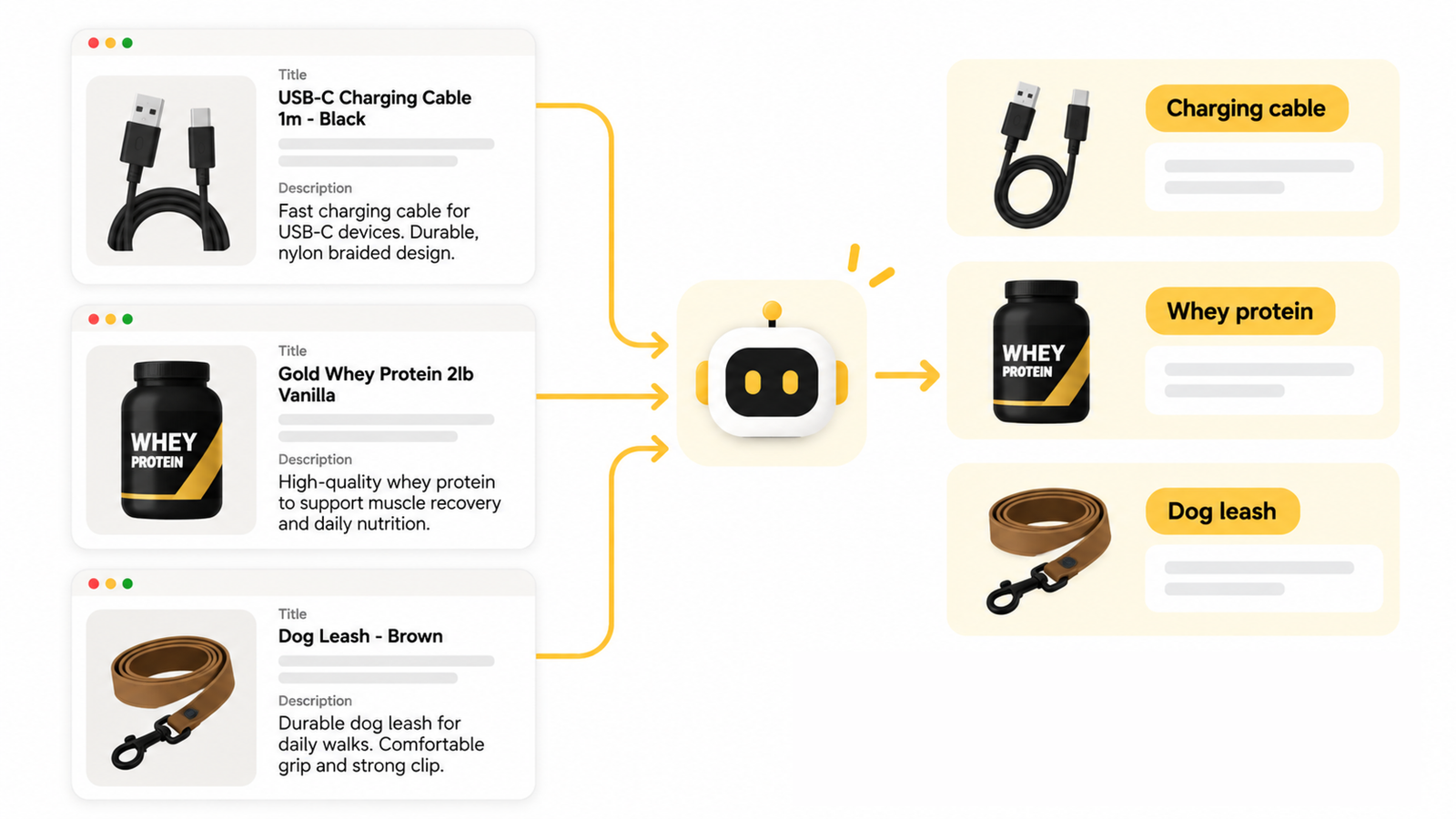
How the AI picks products
It does three things, in order.
1 · It works out what each product is. The AI reads every product’s name and description and gives it a short type — "insulated tumbler," "lip balm," "vitamin D3." That’s how a 20oz Stars & Stripes Tumbler and a 20oz Rose Print Tumbler register as the same kind of product, whatever their names say.
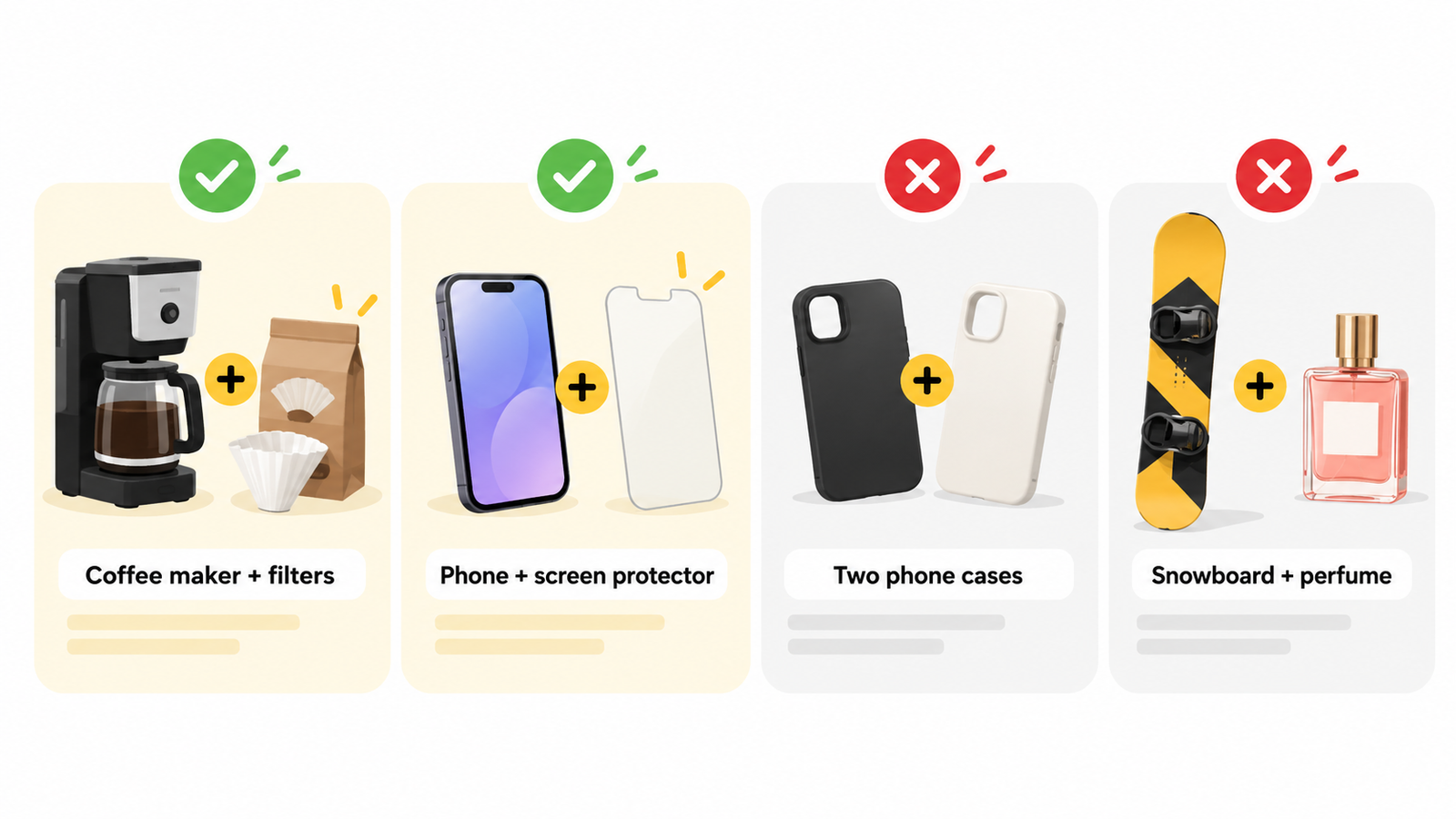
2 · It judges every pair. For each pair of product types, one question: would a shopper buying one have a concrete reason to add the other to the same order? Three possible answers:
Relationship | Meaning | Example |
|---|---|---|
Bought together | Used in one activity; one attaches to or is used up by the other | Printer + ink; leather shoes + polish |
Substitute | Same job — a shopper picks one or the other | Matte vs. gloss lipstick |
Unrelated | Neither | Snowboard + perfume |
Only "bought together" pairs become suggestions. Substitutes never do — a shopper who just chose a lipstick rarely wants a second, near-identical one.
The AI follows strict rules here. Being in the same store, sharing a theme, or appealing to the same customers is not enough — it has to name the specific activity where both products are used together. Products for different worlds (human vs. pet) don’t mix unless one is made for the other. And when it’s not sure, it answers "unrelated" — a wrong suggestion shown to your customers costs trust; a missed one costs nothing.
3 · It checks itself, repeatedly. Every pair is judged several separate times, and only goes live when every check agrees. Pairs the checks disagree on are dropped. On top of that, the TrustShop team regularly re-grades live suggestions with an independent model, and uses the results to improve the AI.
Some real calls, across three kinds of store:
Pair | Verdict | Suggested? |
|---|---|---|
Vitamin D3 + Vitamin K2 (separate) | Bought together — taken as a stack | ✅ |
Vitamin D3 + a combined D3-K2 | Substitute | ❌ |
Maxi dress + earrings | Bought together — styled as an outfit | ✅ |
Men’s shirt + men’s t-shirt | Substitute | ❌ |
Wool coat + fabric shaver | Bought together — one cares for the other | ✅ |
Flag-print tumbler + flower-print tumbler | Substitute — same product, different print | ❌ |
Tumbler + phone charging cable | Unrelated | ❌ |
The right suggestion for the right page
A shopper browsing a product page is in a different mindset from one who just paid. So each "bought together" pair also gets a kind, and every page favors the kinds that fit its moment:
Kind | Example | Favored on |
|---|---|---|
Refill | Razor + blades | Thank-you page, cart |
Protection | Phone + screen protector | Cart, product page |
Care | Leather shoes + polish | Cart, thank-you page |
Accessory | Camera + tripod | Product page |
Style match | Dress + earrings | Product page |
Completes the set | Tent + tent poles | Product page |
Any kind can appear anywhere — the table only decides which suggestions win when several compete for the same spot.
Every suggestion has a reason behind it
The AI never picks a product "just because." Behind each suggestion sits a concrete reason, grounded in your store’s own data — for example:
- the two products are frequently bought together in your orders — say, 128 customers bought both;
- the suggested product is rated highly by verified buyers — like 4.8★ from 230 approved reviews;
- or your reviewers keep praising a specific strength, such as durability.
These reasons stay behind the scenes — your shoppers don’t see them — but they’re what the system weighs when deciding which products earn a spot in your offer. And they’re always your store’s real numbers: the AI never invents an order count, a rating, or a review.
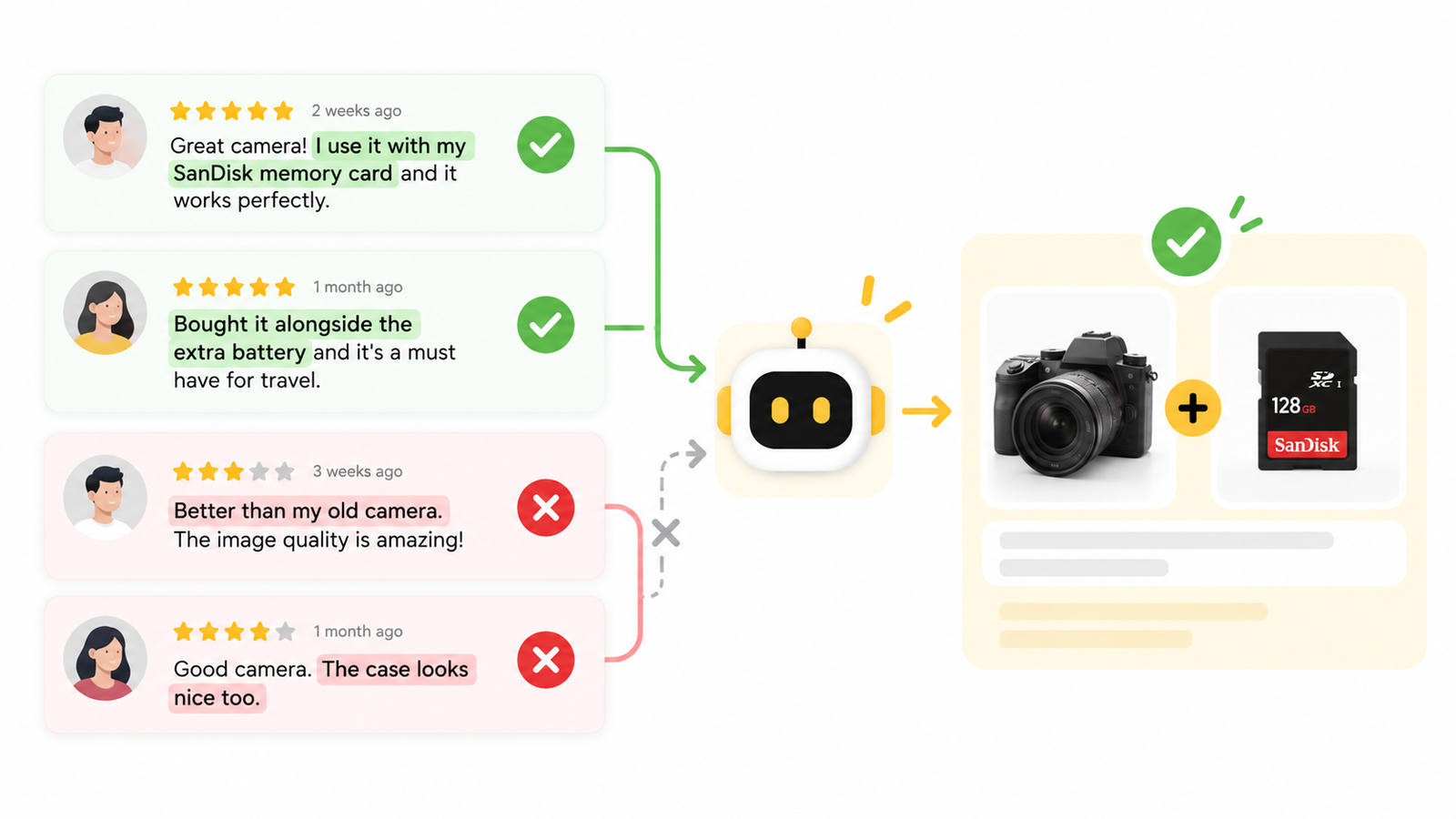
What it uses — and what it never does
It uses: your product names, descriptions, and images; approved TrustShop reviews (for the explanation lines); your own store’s purchase history, where it exists; and one aggregated, anonymous signal about which categories tend to be bought together — computed across many stores at category level only, so it can’t be traced back to any store, product, or customer.
It never: shows your orders, customers, or catalog to other stores · suggests products outside your catalog · creates discounts or changes prices on its own · invents a review or a number · uses shoppers’ personal information — suggestions follow what’s being viewed or bought, never who the shopper is. When a customer’s data is deleted under privacy law, it’s removed from everything the AI uses.
Brand-new store? It still works
The AI understands products from their descriptions, so a new store gets suggestions from day one — a brand-new camping store has "tent + tent poles" immediately, no sales history needed.
Stores with order history get an extra layer: pairs your own customers actually buy together rank higher, and explanations can cite the real count. The system senses which level your store is at — nothing to configure.
And the widget never sits empty. Whenever the AI doesn’t yet have a confident pick, the offer shows related or well-rated products from your store instead, and AI suggestions take over automatically once they’re ready.
When your catalog changes
Nothing to do. Add, rename, or remove products on Shopify and TrustShop picks it up — new products are matched against your whole catalog, renamed ones are re-checked, removed ones vanish from every suggestion. Updates land within minutes to a few hours, and the old suggestions keep showing until the new ones are ready.
If a suggestion looks off
The AI is built to stay quiet rather than guess — but it can still miss, and most misses come down to one thing: not much data to work with yet. A small catalog, or one where products don’t naturally go together, simply holds few real "bought together" pairs. Thin titles and descriptions give the AI little to understand a product by — that’s behind most odd pairings. And with no reviews or order history yet, the AI is working from product content alone, without the extra layer of proof your own customers provide.
You’re never stuck. Four ways out:
- Sharpen the product’s title and description. The AI understands a product through the words you wrote — a description that says clearly what it is and what it’s for fixes most misreads.
- Switch that offer’s product source. AI co-purchase is one of the sources — the offer can use a collection or hand-picked products instead, without touching anything else.
- Keep a product out of suggestions. Use your offer’s settings, or add it to Never offer these products in Settings to remove it from every offer.
- Report the pair. Tell support which two products shouldn’t go together — reports like that feed directly into improving the AI.
And it gets better on its own: every new order and review adds evidence, so suggestions sharpen as your store grows.
Common questions
- Why isn’t product X suggested with product Y, even though they seem a good fit?
Usually one of three reasons: the AI classed them as substitutes (same job), it couldn’t name a specific shared activity so it played safe with "unrelated," or its repeated checks disagreed. Check the product descriptions — a description that clearly says what a product is and what it’s for helps the AI classify it right.
- Why are two similar products never suggested together?
By design. A shopper who just picked a matte lipstick rarely adds a second one. Substitutes suit other offer types, not bought-together suggestions.
- How long until suggestions appear after switching it on?
Usually a few hours for a catalog of a few hundred products. Until then, the offer shows related products through the fallback.
- Why are the suggestions on the product page different from the cart?
Each page favors different kinds of pairs (see "The right suggestion for the right page"). Product pages favor accessories and style matches; the cart and thank-you page favor refills and care products.
- Can I keep a product out of the suggestions?
Products hidden or out of stock on Shopify drop out automatically. For other exclusions, use your offer’s settings or contact support.
- Does the AI ever suggest another store’s products?
No. Every suggestion is a product from your own catalog.
- Is a reason like "128 customers bought both" based on real numbers?
Yes — the count comes from your store’s real orders. When there isn’t enough data, that reason simply isn’t used to pick a suggestion.
- I just added a new product — when will it show up in suggestions?
Usually within a few hours. The system detects it on its own; you don’t need to re-enable the offer.
- Do suggestions take price or margin into account?
The AI picks by how genuinely related the products are. You stay in control of the offer’s discount and conditions, as always.
- Can I check the suggestions before shoppers see them?
Open any product page on your storefront with the offer enabled to see the real suggestions. If a pair doesn’t make sense, tell support which two products — reports like that feed directly into improving the AI.
Updated on: 06/10/2026